Showing posts with label google. Show all posts
Showing posts with label google. Show all posts
Wednesday, September 20, 2017
Samsung sm j710gn 2016 how to remove reset frp google lock
Samsung sm j710gn 2016 how to remove reset frp google lock
Samsung sm-j710gn [2016] how to remove,reset frp, google lock
Operation: Reset FRP
Selected model: SM-J710GN

Samsung j120f frp remove,reset.unlock-sboot,modem,adb enable file
Software version: 28.2
Waiting ADB device... Ok
Reading phone info...
Model: SM-J710GN
Android version: 6.0.1
Product code: SM-J710GZDUXME
Phone version: J710GNDXU2AQC1
PDA version: J710GNDXU2AQB2
CSC version: J710GNOLB2AQC1
CSC country code: MALAYSIA
CSC sales code: XME
HW version: MP 0.300
Phone SN: RF8H
Chip name: EXYNOS7870
Modem board: SHANNON315
Security patch: 2017-03-01
RF cal date: 20160715
IMEI:
Bypass FRP... Ok
For complete reset FRP, goto Backup and reset and make Factory data reset
Done with Samsung Tool PRO v.28.2
welcome to gsm tomal, this blog about of mobile software problem&solution.here you find all information about android, windows mobiles,iphones-flashing,repair,unlocking,boxsetup,flash tools,firmware,StockRoom,flash file free download without password.you also get easy tutorial&solution
For more info connect with me facebook = https://www.facebook.com/gsmtomal, Facebook Fun Page=https://www.facebook.com/Gsmtomalboss/ -Email=engtomalhossain9693@gmail.com-Yahoo= tomalhossain378-Skype= mdtomal.hossain
download file now

Friday, September 15, 2017
Cara Menclaim Verifikasi Blog Di Google
Cara Menclaim Verifikasi Blog Di Google
Cara Menclaim/Verifikasi Blog Di Google
Berbagai cara perlu kita lakukan untuk memaksimalkan blog kita di mata para webmaster dan search engine. Dalam beberapa waktu yang lalu saya pernah membahas artikel tentang cara mendaftarkan blog di google dan untuk artikel kali ini adalah cara verifikasi blog di google. Cara ini adalah langkah lanjutan untuk memaksimalkan indeks search engine google pada blog kita. Apa itu verifikasi lalu bagaimana cara melakukanya ?Cara verifikasi blog di google adalah sebuah langkah yang di lakukan oleh si pemilik website melalui akun google untuk mendaftarkan blognya ke webmaster google sehingga nantinya akan mendapatkan keabsahan yang menandakan bahwa website yang di verifikasi adalah milik dari seseorang yang memiliki akun google tersebut.Sedangkan cara untuk verifikasi blog di google adalah sebagi berikut :
1. Langsung saja ke webmasters google
2. Masuk dengan akun google anda !

3. Di halaman utama webmaster google nama blog anda sudah muncul,lalu klik tombol kelola situs kemudian pilih tambahkan atau hapus pengguna seperti gambar berikut

4. Di halaman berikutnya klik pada tulisan kelola pemilik situs sehingga akan berganti halaman seperti gambar berikut ini

6. Masuk ke blog anda,pilih desain.
7. pilih template kemudian klik edit html lalu akan muncul halaman seprti berikut

9. kembali ke halaman webmaster google kemudian kilk verifikasi.
10. Proses Verikasi blog di google selesai.
Dalam proses verifikasi blog di google ada 3 cara yang di sediakan oleh webmaster gogle salah satunya adalah cara yang saya bahas kali ini.selain itu juga dengan menggunakan akun google yang di gunakan untuk membuat blog di bloger yang secara otomatis akan terverifikasi. Dan cara yang lainnya adalah dengan menggunggah file html yang caranya sama dengan yang sudah di bahas diatas untuk blogspot.
Sampai disini saya rasa anda cukup mengerti dan cukup memahami tentang bahasan cara verifikasi blog di google, mudah mudahan artikel ini bisa bermanfaat bagi anda.
download file now
Friday, September 1, 2017
Download CSC Firmware Asus ZC500TG Google Drive
Download CSC Firmware Asus ZC500TG Google Drive
Custom Rom Batiklicious For ZTE Grand X V970M
By Imoenks Regenerations
 |
| By Imoenks Regenerations |
 |
| By Imoenks Regenerations |
Download Filenya yang didalamnya berisi 4 file
Link : Download
INGAT UDAH DOWNLOAD EKSTRAK DULU FILE KARENA ROM ADA DI DALAM.
Cara Instal Custom Rom ZTE Grand X V970M
INGAT UDAH DOWNLOAD EKSTRAK DULU FILE KARENA ROM ADA DI DALAM.
Cara Instal Custom Rom ZTE Grand X V970M
- Pertama Masuk Ke CWM.
- Wipe Data
- Wipe Cache
- dan Wipe Dalvik Cache
- Selanjutnya instal Rom Batiklicious
- Masih di CWM tanpa wipe wipe lagi langsung instal
- fix keyboard,
- fix systemUi
- dan Volstab.
7. reboot.
Source : ZTE Grand X V970M Indonesia user group
download file now
Sunday, August 27, 2017
Saturday, August 19, 2017
Flashing Bypass Google Oppo Neo 9 A37F
Flashing Bypass Google Oppo Neo 9 A37F
if You Cant Wipe data Via Recovery or Need To Unlock Google Patern Password this method Work 100%!! please dont waste time for try method bypass google on internet.
 |
| Patern Unlock Google oppo A37f Neo 9 |
This Method How To Flashing Oppo A37F fixing Stuck Logo, Reboot or Forgot Google Acount.
Oppo Flasahing preparations A37F
- Download Driver Qualcomm
- Download Firmware A37F
- Extract all the downloads in a folder
- Turn off the Oppo A37F
- Sign in Download Mode "Press and Hold the two buttons Volume Up + Volume Down while plugging the USB From Computer To Oppo A37F".
- Install Qualcomm HS-USB QdLoader 9008 Driver
- Run Msm8x39DownloadTool.exe
- Click Start "flahing process running"
- If you move right you will be notified Completed green color.
- Done.
you can Visit Firmware Database If need other firmware.
download file now
Friday, August 18, 2017
Google Science Fair 2016 howcanwe make things better with science
Google Science Fair 2016 howcanwe make things better with science
ABOUT ZENFONE - Google Science Fair 2016: #howcanwe make things better with science?, The 2016 Google Science Fair opens for submissions today. Together with LEGO Education, National Geographic, Scientific American and Virgin Galactic, we�re inviting all young explorers and innovators to make something better through science and engineering. To learn more about the competition, how to enter, prize details and more, visit the site, and follow along on Google+ and Twitter.
In this post, 2015 Grand Prize winner, Olivia Hallisey, joins us to reflect back on her own experience with Google Science Fair. -Ed.

I had always been curious and interested in science, and knew I wanted to submit a project, but didn�t really know exactly where to begin. I asked my teacher for his advice on selecting a research topic. He encouraged me to choose something that I felt passionate about, or something that outraged me, and told me to look at the world around me for inspiration. So I did. At that time, the Ebola crisis was all over the news. It was a devastating situation and I wanted to help be a part of the solution. I had found my project.
With the outbreak spreading so quickly, I decided that I wanted to find a way to diagnose the virus earlier so that treatment could be delivered as quickly as possible to those who were affected. I read online about silk�s amazing storage and stabilizing properties, and wondered if I could use silk to transport antibodies that could test for the virus. After many failed attempts (and cutting up lots of cocoons) I finally succeeded in creating a temperature-independent, portable, and inexpensive diagnostic test that could detect the Ebola virus in under 30 minutes. I was really excited that my research could help contribute to saving lives, and I was proud to be selected as the Grand Prize winner a few months later.
As the 2016 Google Science Fair launches today, I wanted to share a few tips from my own experience: First, as my teacher once guided me to do, look at the world around you for ideas. If you�re stuck, try the Make Better Generator to find something that excites or inspires you. Second, find a mentor who�s interested in the same things as you. There are a lot of helpful ideas on the GSF site to get you started. And finally, don�t get discouraged�often what first appears like failure can teach you so much more.
I urge other teenagers like me to take this opportunity to find a way to make the world around them better. Every one of us, no matter our age or background, can make a difference�and as young people, we�re not always so afraid to try things that adults think will fail. But change doesn�t happen overnight, and it often starts with a question. So look at the world around you and challenge yourself to make something better.
Science isn�t just a subject�it�s a way to make things better. So I hope you�ll join the conversation and enter the Google Science Fair this year. Our world is waiting to see what you come up with!

download file now
Thursday, August 17, 2017
Block Contact Number On Google Duo
Block Contact Number On Google Duo
InfinityBEST-V2.23 CRACK BY BIPLOB TELECOM

InfinityBEST-V2.23 CRACK
BY BIPLOB TELECOM
GSMBIPLOB007@YAHOO.COM
MOBILE+8801735852007


download file now
Firmware Advan i4A V7 0 Google Drive
Firmware Advan i4A V7 0 Google Drive
Custom Rom Xperia Z2 for LG e410
by
Rif Dev AI
 |
by Rif Dev AI |
 |
by Rif Dev AI |
Features
All of CyanogenMod 11.0s features
Full Z2 experience & Apps by Sony
ads free
ro.config.low.ram=false
Z2 Theme / Bootanimation (Made by Rif Dev AI) / Sounds / Keyboard / Apps
X-Reality
XLoud & ClearAudio
Xperia Apps:
Xperia Album
Xperia Movies
Xperia Walkman
Xperia Social Life
Xperia Calculator
Sony Converter
Xperia Calendar
Xperia Notes
Xperia Torch
Sony Car
Play Station Mobile
Smart Connect
Xperia Sketch
Xperia lounge
Motion Shot
Xperia Widgets
Sony clock
Sony messaging
Sony tasks
xperia z lock screenSony select
bug
bluethoth
camera
sensor
All of CyanogenMod 11.0s features
Full Z2 experience & Apps by Sony
ads free
ro.config.low.ram=false
Z2 Theme / Bootanimation (Made by Rif Dev AI) / Sounds / Keyboard / Apps
X-Reality
XLoud & ClearAudio
Xperia Apps:
Xperia Album
Xperia Movies
Xperia Walkman
Xperia Social Life
Xperia Calculator
Sony Converter
Xperia Calendar
Xperia Notes
Xperia Torch
Sony Car
Play Station Mobile
Smart Connect
Xperia Sketch
Xperia lounge
Motion Shot
Xperia Widgets
Sony clock
Sony messaging
Sony tasks
xperia z lock screenSony select
bug
bluethoth
camera
sensor
link rom
Download
Download
klau penyiapan wizard fc instal nih lewat cwm link
Download
cara instal rom Xperia Z2 for LG e410 :
- masuk cwm
- fatory reset
- wipe chace
- wipe dalvik chace
- instal rom
lansung reboot
emang bootnya agak lama tunggu aja
creadit
- Rif Dev AI
- caio99br
- galaxy user
- theonepharaoh
- alinolaw71
- Amir Hoseinina
- thank to
- allah
- xda developer
- grup lg l1 ii
- grup lg l3 ii
- all member dan admin
- dan terimakasih
Source : LG Optimus L1 II E410 Indonesia
Stok Rom LG Optimus L1 II E410 >> Stock Rom Mod Deodex for LG Optimus L1 II E410
download file now
Tuesday, August 15, 2017
Cara Mudah Flash Himax Pure 3s Tested Sukses 100 Firmware via Google Drive Free Tanpa Password
Cara Mudah Flash Himax Pure 3s Tested Sukses 100 Firmware via Google Drive Free Tanpa Password
Kings Gameplay Version-1

Installation:
- Extract "Kings Gameplay V1" rar file , then copy all files from Kings Gameplay V1 folder and paste into cricket root directory [ C:Program FilesEA SPORTSEA SPORTS(TM) Cricket 07 ]
- Before Copy and and paste my Gameplay take Backup on your old gameplay and Delete your all old gameplay files.
- Dont mingle my gameplay files with other gameplay files bcoz you maynot get realistic gameplay.
- Run Game and Play game with Realistic gameplay.
Needed:
- My Gameplay finely work on with AbBh Modified Cricket07 exe..
- You will Download AbBh Modified Cricket07 exe here --> AbBh Modified Cricket07 exe
Features:
- Cpu can bat depends on situation.
- Starting Power play overs cpu run rate above 8 and middle over 5, late few overs 10. You can limit Cpu run rate by bowling good length ball.
- Edges also possible and Its depending on pitch type.
- You can hit flat six and also out of ground sixes.
- Gameplay Suitable to All three Formats(TEST,ODI,T20) Note: I tested my Gameplay with AbBh Modified Cricket07 exe. So Strongly Recommended to use AbBh Modified Cricket07 exe for My Gameplay..
DOWNLOAD KINGS GAMEPLAY PATCH V1.0
Credits: Special thanks to AbBh for giving permission to use AbBh Modified Cricket07 exeComments Appreciated for update better Gameplay.
download file now
Wednesday, August 2, 2017
Download CSC Firmware Asus ZC450TLT Google Drive
Download CSC Firmware Asus ZC450TLT Google Drive
CUSTOM ROM SGS J1 for ZTE Blade G V815W
Port by Irwan F.Putra
SMOOTH FAST AND SOFT
FITUR :
- Odex
- Dual 3G
- Ram 2gb (fake)
- Camera 16mp (fake)
- Dolby Digital
- Tweak Pure Performance and LSpeed
- Sony bravia engine
Link : SGS_J1_IFP.zip
BUG :
- Pas klik tombol pilih/menu larinya ke recent app
- Take screenshoot tekan tombol tengah sama power kaya device samsung kebanyakan..!
** Cara Install **
- - Wipe data/factory reset
- - Wipe cache
- - Wipe dalvik
- - Instalall zip from sd card
- - Choose zip from sd card...cari file rom nya lalu pilih oke..tunggu prosesnya sampai selesai.
- - REBOOT
#Warning...!!
sebelum install rom backup dulu NVRAM anda di sd card..kalau terjadi invalid imei tinggal copy aja..
nvram ada di system/data/nvram
Source : UnOfficial ZTE Blade G V815W Indonesia
download file now
Akilah’s “Afrocentric life” doodle wins Doodle 4 Google 2016
Akilah’s “Afrocentric life” doodle wins Doodle 4 Google 2016
ABOUT ZENFONE - Akilah�s �Afrocentric life� doodle wins Doodle 4 Google 2016 , Today�s blog post is by the winner of this year�s Doodle 4 Google competition, 10th grader Akilah Johnson. Given the contest�s theme��What makes me...me��who better than the young artist herself to answer that question? - Ed.
When I was younger, I attended Roots Public Charter School and Roots Activity Learning Center in Northwest Washington, D.C. These schools promote a strong connection to African heritage, and an Afrocentric lifestyle; we regularly celebrated important African American people and I learned a lot about my history as an African American. As I grew older, I realized that the black people that came before us have made us into what we are today. So of course I had to include them in my doodle on the theme �What makes me...me.�
My goal with my art was to not only turn heads but souls as well�not only for someone to see it and be amazed by it but also to have them understand and connect with it. My drawing explores childhood themes and then moves into reflections on our society. Everything surrounding the word "Google" depicts my characteristics. Of all the things I chose to include, the six most special to me are the Symbol of Life (the ankh), the African continent, where everything began for me and my ancestors, the Eye of Horus, the word "power" drawn in black, the womans fist based on one of my favorite artist�s works, and the D.C. flag�because I�m a Washingtonian at heart and I love my city with everything in me!
 Ive always been encouraged to pursue art, especially by my teachers�first Baba Camera from Roots, and now my art teacher Zalika Perkins. But participating in Doodle 4 Google gave me an understanding of why art matters and why MY art matters�because it speaks to people. No matter our differences, everyone is touched by art in some way. Winning this competition opened my eyes to the many types of art and the many ways it can resonate with people. I�m excited to keep creating art that matters.
download file now
Wednesday, March 29, 2017
How to Download APK file directly from Google Play website to PC Mobile
How to Download APK file directly from Google Play website to PC Mobile
- Enable Unknown sources in your phones security settings (Settings > Security > Unknown sources) to transfer APKs from your PC.
- Connect your phone to your PC using a USB cable. The necessary drivers should install automatically and your phone should show up like a USB storage device.

- Next, copy the APK you downloaded to your PC onto your phone (this is called sideloading). Id recommend an obvious location like the Downloads folder.
- Go to the Downloads folder on your phone using its File Manager app, then tap the APK you just transferred over. It will request your permissions then install itself to your device.
- For your peace of mind and security, disable Unknown Sources when you’re done.
Download APK file from Google Play using a website
If youre a more casual APK downloader then a Chrome extension is probably not really necessary. Instead, you can just visit a dedicated site for generating APK download links whenever you need to.
- Go to the Play Store www.playstore.com and find the app you want to download.
- Copy the apps URL address from the browsers address bar.
- Next, go to a site like Evozis APK Downloader (Evozi also has a Chrome/Firefox extension) and paste the app package name (or the whole Google Play URL if youre lazy) in the box at the top of the page.

- Hit the blue button to generate the download link and save it to your computer.
- Sideload the APK to your phone/tablet and install it as above.
Available link for download
Sunday, March 26, 2017
Chrome Browser Google Apk Free Download Android App
Chrome Browser Google Apk Free Download Android App
Chrome Browser - Google APK By Google Inc. (com.android.chrome)
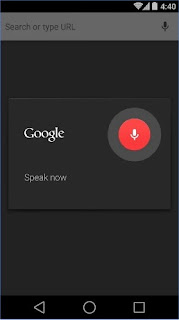
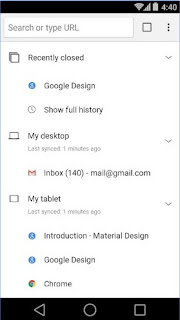
Google Chrome browser on your list quickly, and I like the Android phones on the desktop board.
- Sync application - it accessible and open tabs easily, bookmarks laptop, phone or tablet.
- Environment - 50%, in order to reduce mobile data usage while browsing
- View topic - appears select again, and the type of search results to quickly access previously visited pages
- Voice search - search Google Voice without the use of magic to respond to input
- Translation - easy to read web pages
- simple gestures - and flip through many tabs open, the desires of your heart, and Haman rushed out side-by-side on the front panel
- Privacy - Security use incognito history without ...
If you want to make a suggestion that Chrome Browser - Google Android applications be better and more smoothly to run android app please contact the developer to get a response back from the advice you give. You may also report a bug in Chrome Browser - Google Android applications so that application developers will give suggestions and improvements and updates to your Chrome Browser - Google application directly.
Specifications Chrome Browser - Google Applications:
Android = Version 4.1 and Higher
Size = 44 MB
Application Type = Web Browser Online App
Free Download Android Chrome Browser - Google Apk
| Download App(Direct Link) | Play Store (Updated/Last Version) |
Report Broken Link : Contact Us
That’s Chrome Browser - Google Android Applications that we can share today. To get a free Android app Recent please visit our other Android app If you have difficulty to install an application you can leave comments on this article. You can also contact the Admin of the website. If you want to order or submit an application or a Game Android that you create reports that there is Chrome Browser - Google dead link or a bug on this website. Thank you for your visit FullApkZ website. Stay tuned to our post for the latest information regarding Android.
Available link for download
Tuesday, March 21, 2017
Goog212 Aplikasi Mesin Pencari Islami Mirip Google
Goog212 Aplikasi Mesin Pencari Islami Mirip Google

Download Aplikasi Goo212 - Aplikasi Mesin Pencari Islami Mirip Google
DESKRIPSI
Inikah aplikasi Goo212 atau Mesin Pencari Islami mrip mesin pencari raksasa dunia "Google", bahkan karena kemiripannya, sempat dklaim jadi pesaing Google.
Aplikasi Goo212 atau Mesin Pencari Islami adalah buatan anak negeri yang dikhususkan untuk menuntun umat-umat Islam yang sesat ke jalan yang benar di Indonesia,
Sesuai nama aplikasinya, Goo212 atau Mesin Pencari Islami, jadi semua isinya tentang Islam, khsususnya Islam di Indonesia.
SCREENSHOT

LINK DOWNLOAD
Nama: Goo212 - Mesin Pencari Islami
Ukuran Aplikasi: 2 MB
Versi: 2.0
Link Download: DOWNLOAD
Available link for download
Sunday, March 19, 2017
Monitor for Google For Windows Free Download Technical Shk
Monitor for Google For Windows Free Download Technical Shk
Monitor for Google For Windows
Get Monitor for Google For Windows Free Download - Technical Shk. This is windows-based application that serves clients as a useful and simple to utilize programming for Internet web rankings rapidly. Fundamentally a product screen for Google, Free Monitor for Google empowers clients to track their SEO endeavors in the Internet. The application clients can then gauge how well they are getting along and what ought to be their next stride. With this application, utilizers can discover their position in Googles rankings and also know prevalent catchphrases in order to get more movement valuable for SEO endeavors. This application sends an inquiry to Google and shows, other than the position of ones site by the objective catchphrases, additionally how the contenders are dong also.

Monitor for Google For Windows Free Download
File Size: 1MB
Price: Free

Available link for download
Thursday, March 16, 2017
Make Video Calls With The New Google Launched App Duo
Make Video Calls With The New Google Launched App Duo
Google released its new video chat app called Duo, at Google I/O in May and rolls out globally on Android and iOS and now, it is almost ready for downloading. Duo is a one-to-one video calling app for everyone – designed to be simple, reliable and fun, so you never miss a moment. Some of its selling points are its simple interface, end-to-end encryption, and the fact that it works seamlessly even with poor network connections. Its mobile only, there is no desktop app or web version and operates on both iOS and Android.Features» Simple interface: Pick a loved one and jump right in, with a simple interface that brings video to the forefront.
» Knock Knock: See the caller before you answer with Duo’s live preview feature.
» High-quality video: Experience faster and more reliable video calls whether you’re on Wi-Fi or on-the-go.
» Cross-platform: Video call all your friends across Android and iOS with just one simple app.
All you need is phone number. It has not been rolled out yet, but will soon be rolled out to all countries in a few days from now. Check Google Play and iTunes Store to Pre-register.
http://www.shelaf.com/2016/08/make-video-calls-with-new-google.htmlposted by ConnectMe Duo is a one-to-one video calling app for everyone – designed to be simple, reliable and fun, so you never miss a moment. Some of its selling points are its simple interface, end-to-end encryption, and the fact that it works seamlessly even with poor network connections. Its mobile only, there is no desktop app or web version and operates on both iOS and Android.Features» Simple interface: Pick a loved one and jump right in, with a simple interface that brings video to the forefront.» Knock Knock: See the caller before you answer with Duo’s live preview feature.
» High-quality video: Experience faster and more reliable video calls whether you’re on Wi-Fi or on-the-go.
» Cross-platform: Video call all your friends across Android and iOS with just one simple app.
All you need is phone number. It has not been rolled out yet, but will soon be rolled out to all countries in a few days from now. Check Google Play and iTunes Store to Pre-register.
Available link for download
Wednesday, March 15, 2017
How To Install TWRP Recovery On Google Pixel Pixel L
How To Install TWRP Recovery On Google Pixel Pixel L

Right from the on set when the Google Pixels smartphone was released, I have been emphasizing on its amazing features probably because it was an official product from Google. There are lots of amazing features packed on the Google and if youre lucky to be one of the owners, explore deep into your device and unveil those features yourself.
Earlier after the Pixels smartphone was released, there has been a lot of pressure from varieties of people demanding for an official Twrp recovery on both the Pixel and Pixel XL respectively... Luckily the Twrp recovery is now available for your smartphone. However before installing a Twrp recovery on your Pixel smartphone, its recommended and a must that you have to unlock your bootloader and root your Pixel device. If perhaps youve already done that, and feel like flashing some cool custom ROMs, then a custom recovery is mandatory.
Download Twrp Recovery For Google Pixel & Pixel L
Firstly youve to download the official Twrp recovery for your Pixels device. Its one of the biggest project powered by Teamwin and comes with lots of essential plethora features. However we do like to draw you back on some precautions and important Notes that youve to take before following our procedure.Precautions
- Installing Twrp Recovery may void your device warranty since it requires rooting.
- Ensure that your phone has at least 60-90% charged to prevent accidental shutdown in between the process.
- You may lose data. You may miss an important phone call. So backup everything on your device
- Were not responsible for any brick you encounter while following our procedure.
TWRP Recovery For Google Pixel (Sailfish)
TWRP Recovery For Google Pixel
TWRP Recovery For Google Pixel XL
Step 1: Download TWRP Manager on your device then install it.
Step 2: Now transfer the Twrp recovery zip you downloaded earlier on the internal storage of your device.
Step 3: From your app drawer, locate and launch the Twrp manager app. Then click on install.
Step 4: Now choose or click on "Select zip" at the bottom and locate the TWRP zip file you moved earlier on your device internal memory.

Step 5: After locating the TWRP zip file, click on Flash now and wait till the process complete itself.
Done! Youve successfully installed TWRP on your Pixel smartphone.
Note: If you accidentally flash TWRP to your device using fastboot instead of temporarily booting the image, you will need to download the latest factory image for your device and reflash the boot image.
Step 1: Firstly youve to enable USB debugging and OEM Unlocking from Setting>Developer option.

Step 2: Next download TWRP .img and zip file for your respective device from above link and rename it to recovery.img
Step 3: Now place or transfer the recovery.img on ADB and fastboot folder.
Step 4: Now locate the ADB folder and open the command window by pressing and holding the ‘shift’ key and right-click anywhere in that folder.

Step 5: Boot your device into fastboot mode by pressing and holding the Power and Volume Down buttons at the same time.
Step 6: Now connect your device to PC by using a USB cable. To check your connection enter “fastboot devices“ in command prompt. It will return your device serial number meaning your device properly connected.

Step 7: Next from the command window, run thethe following command to temporary boot your device into TWRP.
Step 9: The zip will install TWRP to both boot slots.
Done! Youve successfully installed TWRP Recovery on your Google pixel and pixel XL.
Note: All image on this article belongs to there respective owners. We decided to use it in other to clarify this tutorial..TWRP Recovery For Google Pixel XL (Marlin)
How To Install Twrp Recovery On Google Pixel & Pixel L
Were going to share two method on how you can install Twrp recovery on your Pixel smartphone. Thus you can choose which method you prefer most.Method 1 : Install Twrp Recovery Via Twrp Manager
Now lets assume youve already rooted (not compulsory) your Pixel device and unlocked bootloader. Since theyre they mandatory things you need to do before venturing into this procedure.Step 1: Download TWRP Manager on your device then install it.
Step 2: Now transfer the Twrp recovery zip you downloaded earlier on the internal storage of your device.
Step 3: From your app drawer, locate and launch the Twrp manager app. Then click on install.
Step 4: Now choose or click on "Select zip" at the bottom and locate the TWRP zip file you moved earlier on your device internal memory.
Step 5: After locating the TWRP zip file, click on Flash now and wait till the process complete itself.
Done! Youve successfully installed TWRP on your Pixel smartphone.
Method 2: Install TWRP Recovery Via ADB Fastboot
This method can be a little bit time consuming however theres no hard in trying. Youve to make sure your PC is ready and fully charged to the brim before proceeding with our guide. Before that, downloaded the below requirements.Note: If you accidentally flash TWRP to your device using fastboot instead of temporarily booting the image, you will need to download the latest factory image for your device and reflash the boot image.
Requirement
- ADB USB Driver.
- ADB Fastboot Tool.
Step 1: Firstly youve to enable USB debugging and OEM Unlocking from Setting>Developer option.
Step 2: Next download TWRP .img and zip file for your respective device from above link and rename it to recovery.img
Step 3: Now place or transfer the recovery.img on ADB and fastboot folder.
Step 4: Now locate the ADB folder and open the command window by pressing and holding the ‘shift’ key and right-click anywhere in that folder.
Step 5: Boot your device into fastboot mode by pressing and holding the Power and Volume Down buttons at the same time.
Step 6: Now connect your device to PC by using a USB cable. To check your connection enter “fastboot devices“ in command prompt. It will return your device serial number meaning your device properly connected.
Step 7: Next from the command window, run thethe following command to temporary boot your device into TWRP.
fastboot boot recovery.imgStep 8: Once your device had rebooted to TWRP, click on Install and select the TWRP installer zip file and Swipe to flash the file.
Step 9: The zip will install TWRP to both boot slots.
Done! Youve successfully installed TWRP Recovery on your Google pixel and pixel XL.
How To Root Google Pixel & Pixel XL
Once youve successfully installed TWRP Recovery on your Pixel device, theres a high tendency that it will remove root access if you are currently rooted. A SuperSU update will be required to allow TWRP and SuperSU to co-exist. Thus simply Root Your Google Pixel and Pixel XL with SuperSU. To do this, reboot your Pixel device to TWRP Recovery and flash the SuperSU zip file.Conclusion
Installing TWRP Recovery on your Pixel smartphone can be quite an easy thing to do. You just have to master the procedure and follow it carefully. Once the TWRP Recovery has been installed on your device, you can then enjoy flashing your desired custom ROMs.Available link for download
Thursday, February 23, 2017
Cara Daftar Dan Verifikasi Blog ke Google Webmaster Tools
Cara Daftar Dan Verifikasi Blog ke Google Webmaster Tools

Tutorial Cara Daftar Dan Verifikasi Blog di Google Webmaster Tools
Singkat saja tanpa menggunakan bahasa yag terlalu tinggi, saya akan langsung menjelaskan ke intinya saja. Jadinya mendaftar dan verifikasi Blog di Google Webmaster Tool adalah suatu hal yang wajib untuk menaikkan trafic suatu Blog, kkhususnya Blog yang baru saja dibuat.
Baca juga:
Cara Daftar Dan Verifikasi Blog ke Bing Webmaster Tools
Cara Submit URL Postingan ke Google Dan Bing
Salah satu dampak tidak terdaftarnya+verifikasi Blog di Google Webmaster Tool adalah artikel/postingan yang dishare akan sangat lama terindex oleh mesin pencari nomor satu dunia "Google". Sebaliknya jika Blog yang terdaftar+verifikasi maka artikel/postingan yang baru saja di share akan sangat cepat terindex oleh mesin pencari Google + dengan syarat Submit URL ke Google (tanpa daftar dan verifikasi di Google Webmaster Tool tidak akan bisa).
Mengingat Google adalah mesin pencari nomor satu dunia dan mesin pencari yang paling banyak digunakan oleh pengguna internet untuk mencari informasi.
Berikut Cara Daftar Dan Verifikasi Blog ke Google Webmaster Tools di bawah ini:
- Langsung menuju halaman Google Webmaster Tool (pastikan kalian sudah punya akun gmail yang aktif, jika belum punya daftar dulu di https://gmail.com)
- Masukkan alamat Email dan Passwoard kalian, setelah sudah login, nanti kalian akan langsung dibawa kehalaman pendaftaran, masukan alamat Blog kalian, kemudian klik Tambahkan Properti

- Klik Metode Alternatif
- Pilih Tag HTML
- Copy kode verifikasi
- Login ke Blogger.com
- Langsung menuju menu Template/Edit HTML, cari kode <head> (gunakan CTRL F)
- Pastekan tepat dibawah kode <head>
- Klik Simpan
- Kembali ke halaman Google Webmaster Tool, klik Verifikasi

- Berhasil, klik Lanjutkan


Available link for download
Wednesday, February 22, 2017
Download Google Korean Input APK 11 9 MB
Download Google Korean Input APK 11 9 MB
Google Korean Input APK


The description of Google Korean Input
Google Korean Input
[Features]
- Android TV support.
- Gesture typing on Korean keyboard.
- VoiceIME: Enter text using voice input.
- Suggestion dictionary: Suggests corrections for mistyped words and suggests next word after typing one word.
- Single Vowel layout: Provides larger buttons to reduce mistyping.
- H/W Keyboard support (Shift + Space or Right Alt or Ha/En key to switch between Hangul and English).
- Themes
[How to enable]
- Settings > Language & input > Check Google Korean Input
- Touch Default (Input method) > Select Korean (Google Korean Input)
[How to disable]
- Settings > Apps > All > Google Korean Input > Disable
Download 11.9 MB
Read more »
[Features]
- Android TV support.
- Gesture typing on Korean keyboard.
- VoiceIME: Enter text using voice input.
- Suggestion dictionary: Suggests corrections for mistyped words and suggests next word after typing one word.
- Single Vowel layout: Provides larger buttons to reduce mistyping.
- H/W Keyboard support (Shift + Space or Right Alt or Ha/En key to switch between Hangul and English).
- Themes
[How to enable]
- Settings > Language & input > Check Google Korean Input
- Touch Default (Input method) > Select Korean (Google Korean Input)
[How to disable]
- Settings > Apps > All > Google Korean Input > Disable
| Rating | : | 3.4 of 5.0 |
| Developer | : | Google Inc. |
| Versi | : | v1.5.3.138040306-arm64-v8a |
| Update | : | Nov 18 2016 |
| Ukuran | : | 11.9 MB |
| OS | : | v1.5.3.138040306-arm64-v8a (1530216) for Android 4.2+ (Jelly Bean MR1, API 17) |
Available link for download
Subscribe to:
Posts (Atom)