Showing posts with label gionee. Show all posts
Showing posts with label gionee. Show all posts
Thursday, February 9, 2017
Gionee M2017 With Massive 7000mAh Battery Dual Rear Camera GB RAM 128GB ROM
Gionee M2017 With Massive 7000mAh Battery Dual Rear Camera GB RAM 128GB ROM
Gionee M2017 is an upcoming flabbergast smartphone from Gionee. The device packs with several interesting features, but the most interesting is its battery capacity. Gionee M2017 comes with two 3500mAh batteries inside, providing total battery capacity of 7000mAh put in a single phone, which come with support for Quick Charge 3.0.

The Gionee M2017 – made to perfection and hot to the eye of consumers, the said mobile phone can use up to 25.89 hours of video playback when we are talking about movies and a standby time of 915.42 hours. Surely it suits also for games and other things you want to do on your phone.
This is the biggest battery life among other phone distributed and available in market today.
Apart from the battery life, the Gionee M2017 also comes with 6GB of the RAM which smoothly play very high-end games that can play no hassle into its RAM with the combination of Octa-core Processor.
The rest of the specs arent bad either. Heres the Key Features of this Gionee M2017
There has been no official statement from the company regarding the matter, we will have to wait and see if Gionee M2017 is able to make its way out of China to other territories or not.
This is the best ever Gionee device, looking forward for the availability of this wonderful device in Nigeria market early 2017.
http://www.shelaf.com/2016/12/gionee-m2017-with-massive-7000mah.htmlposted by ConnectMeThis is the biggest battery life among other phone distributed and available in market today.
Apart from the battery life, the Gionee M2017 also comes with 6GB of the RAM which smoothly play very high-end games that can play no hassle into its RAM with the combination of Octa-core Processor.
The rest of the specs arent bad either. Heres the Key Features of this Gionee M2017
- 2560 x 1440 Display Resolution
- Screen size 5.7 inches QHD display with curved edges
- 6GB RAM
- Octa core 653 Qualcomm Snapdragon Processor
- 6.0 Android Marshmallow with Amigo 3.5 UI skin
- Dual Rear Camera which has 13MP and 12MP
- 8MP Front Camera
- Advance Fingerprint sensor
- Cool looking leather back panel
- 128GB internal storage
- 7000mAh Battery
- Apart for the biggest battery, the cameras also one of the big hit regarding to this smartphone for having a dual camera located at the rear side. The 13MP and 12MP is totally beyond our expectation and best in regards to that points.
There has been no official statement from the company regarding the matter, we will have to wait and see if Gionee M2017 is able to make its way out of China to other territories or not.
This is the best ever Gionee device, looking forward for the availability of this wonderful device in Nigeria market early 2017.
Available link for download

Friday, January 27, 2017
How To Change Repair IMEI of New MTK phones Tecno Infinix Gionee etc
How To Change Repair IMEI of New MTK phones Tecno Infinix Gionee etc
For some reason, you still want to use GLOs Blackberry plan on your Android phone, despite new MTN cheap plans and Etisalat new data plans, well, this post is for you. Your phone suddenly starts displaying unknown imei or similar error, this post is also for you. Learn how to change/Repair IMEI of new MTK phones running Android 5.0 Lollipop and later in less than 2minutes.

Disclaimer: IMEI change is illegal and voids the warranty of your phone. I am not responsible for any problem you create after this (though i may be willing to help) and in case you brick your device, OYO may be your case (Just kidding)

NB: YOUR PHONE MUST BE ROOTED
Steps:
==> Download Chamelephon.apk (See link at the end of post)
==> Install and open downloaded app
==> Grant SuperUser access to the app
==> Paste the new IMEI into the respective box (SIM1 or SIM2)
==> Click "Apply New IMEI" and restart your device
==> Dial *#06# and confirm the new IMEI
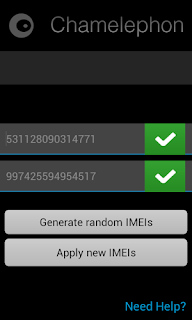
Gbam! You have changed your IMEI in less than 2 minutes. For more ways to change other phone IMEI, check this post here.
Download Chamelephon.apk here
Got questions, drop a comment below!!!
Available link for download
Saturday, January 21, 2017
How to Root Tecno L5 M3 Mini Gionee Long Awaited For Die Hard Root Users Enjoy
How to Root Tecno L5 M3 Mini Gionee Long Awaited For Die Hard Root Users Enjoy
Rooting some Smartphones can be a difficult task. Tecno l5 is one of those Android Phones programmed to give tweakers tough time but we’ve found a way to go around it and root Tecno L5. I’ll show you how to do so in this post. Root Tecno L5
Equirements
==>PC with enabled internet connection
==>Patience in following
==>SP Flash tool

How Can I Root Tecno L5?
==>Download SuperSU.zip here and save it to your phones SD card
==>Download the ported TWRP for Tecno L5 here
==> Unzip the TWRP zip file and flash the recovery image to the phone using SP flash tool ( You can download Download new MediaTek SP Flash Tool v5.1516 ~here or HERE) IT WORK SUPERB 4 TECNO L5
Also Read: New Latest MediaTek SP Flash Tool v5.1516 & MTK Droid Root & Tools v2.5.3
How Can I Flash it Using SP Flashtool? Please see guide here==>Boot the phone into TWRP recovery mode (by Holding the Vol Up and Power button for 5 seconds)
==>In TWRP recovery, Choose install zip from sdcard- to Choose zip from sdcard use vol up and down scroll up and down then choose the Supersu.zip file from the root of your sdcard.
Scroll to yes and install, after a successful flashing go back and reboot.
You have now rooted your L5! To be fully sure your Tecno L5 is rooted, Download HERE Root checker to confirm root or Other Root Checker
Credit to Hovate
................................................................................................................................................................
How to Root Gionee M3 Mini
This is just a simple guide to all those who uses Gionee M3mini, on how to root your device. Just follow the guide and I promise you won’t be lost.
Requirements
==>PC with enabled internet connection
==>Patience in following
==>SP Flash tool
==>PC with enabled internet connection
==>Patience in following
==>SP Flash tool

How Can I Root Gionee M3 Mini?
==>Download SuperSU.zip here and save it to your phones SD card
==>Download the ported TWRP for Gionee M3mini here
==>Download the ported TWRP for Gionee M3mini here
==> Unzip the TWRP zip file and flash the recovery image to the phone using SP flash tool ( You can download SP Flashtool here)
How Can I Flash it Using SP Flashtool? Please see guide here
==>Boot the phone into TWRP recovery mode (by Holding the Vol Up and Power button for 5 seconds)
==>In TWRP recovery, Choose install zip from sdcard- to Choose zip from sdcard use vol up and down scroll up and down then choose the Supersu.zip file from the root of your sdcard.
Scroll to yes and install, after a successful flashing go back and reboot.
You are now rooted! To be fully sure your Gionee M3mini is rooted, go straight to Google Playstore and download root checker to verify your root status.
Are you still confused? Ask your questions.
==>Boot the phone into TWRP recovery mode (by Holding the Vol Up and Power button for 5 seconds)
==>In TWRP recovery, Choose install zip from sdcard- to Choose zip from sdcard use vol up and down scroll up and down then choose the Supersu.zip file from the root of your sdcard.
Scroll to yes and install, after a successful flashing go back and reboot.
You are now rooted! To be fully sure your Gionee M3mini is rooted, go straight to Google Playstore and download root checker to verify your root status.
Are you still confused? Ask your questions.
Credit - Team Hovatek
Available link for download
Wednesday, January 18, 2017
Stay OS v2 Custom Rom For Tecno H6 Lovers Infinix Hot Gionee P4 Users
Stay OS v2 Custom Rom For Tecno H6 Lovers Infinix Hot Gionee P4 Users

Stay OS v2 custom rom is a Stay our self Rom which is based on Mediatek (MTK) devices. It is specifically modified for all day use or you can call it daily drive based rom. It also offers a vast range of colors and also awesome features and better performance for its users. Stay os v2 has many and comfortable features for its users. Without saying much about this superb rom, ill surgest you install this stay os v2 rom to your device and see for yourself.


FEATURES OF STAY OS V2
Pre-Rooted
High -Set navbar
Statusbar
Enable / Disabling the operators name
Moves Clock on the right or left
Displays seconds on the clock
Displays the name of the day on the clock
Setting Color hour
Battery Icon
Colors on the battery icon
Enable / Disable the battery icon
Enable / Disabling the percentage of battery level
Monitor Internet data
Set Color monitor Data
Setting Dynamic color
Gesture
Features Gestures anywhere
Application Circular
Level Visibility
- Size Quick keys
- Recents Panel
- Enable / Disable button deletion
- Enable / Disabling of the memory
- Location deletion button (right or left)
- Screen Notifications
- Notification Weather
- This Setting fast
- Selection Lot and location shortcut
- Press Long on the icon to enter the settings
- As Occupying music with a single click
- Record Sound and the screen easily
- Maximize RAM used with a single click
- Slider Screen brightness
- Buildprop Highly tweaked By Me (Golden Fx)
-.Good battery Backup
- Smoothness
- Internet tweaks,image quality increased, awesome audio quality, Sd card speed tweak, Ads blocker, battery saver, faster steaming and many more.
HOW TO INSTALL STAY OS V2
Download Stay Os v2.zip to root of your sd card.
Boot into recovery mode and do the following:
Wipe/ Factory reset
Wipe Cache
Wipe Delvich
Select Stay Os v2.zip from sd card and install.
Flash Gapp After Flashing Stay Os v2
After doing above simple steps, reboot your phone.
Download Stay Os v2 For Tecno H6 Here.
Download Stay Os v2 For Infinix Hot Here
Download Stay Os v2 For Gionee P4
Download GAPP Here
ALSO READ: Mode On How to Turn Off Blinking Notification/ Led LIGHT in Tecno H6 Custom Rom & all xpose supported devices
source #miahtek
Available link for download
Subscribe to:
Posts (Atom)